My WSL distro booted normally. Then this failed:
wsl --manage Ubuntu --resize 1100GB
My Windows locale is Korean. The corresponding English WSL message is:
The requested operation could not be completed due to a virtual disk system limitation.
Virtual hard disk files must be uncompressed and unencrypted and must not be sparse.
Error code: Wsl/Service/0xc03a001a
The publication log preserves the exact Korean output captured during the experiment. 0xC03A001A is Windows’ ERROR_VIRTUAL_DISK_LIMITATION. Microsoft’s general Win32 table describes compressed or encrypted VHD files on NTFS and the integrity bit on ReFS; WSL’s own English troubleshooting text also names sparse VHD files. The same sentence is often associated with mount failures; here it was operation-specific on WSL 2.7.3.
I exported a disposable Ubuntu VHDX and used separate launch and resize cohorts, with three independent clones per condition in each cohort. The result was clean: all 12 launch clones booted, but all nine non-control resize clones with a compressed or sparse attribute failed. Clearing the matching file attribute restored resize 9 out of 9 times.
One scope note before the numbers: this post is about WSL’s own --manage --resize command. If diskpart compact vdisk printed the same sentence while you were trying to shrink a VHDX, that is a different operation — the previous post measured that path.
Quick answer: shut down WSL, inspect the exact ext4.vhdx file’s Windows attributes, clear only the state you recognize, then retry the resize. Jump to the tested repair flow.
The problem
Microsoft’s current disk-space guide makes expanding a WSL disk look straightforward:
wsl --shutdown
wsl --manage <distribution> --resize <larger-size>
That is exactly the right command on WSL 2.5 and later. It also hides an operation-specific trap: the distro can pass a launch probe while its host-side ext4.vhdx has an NTFS attribute that the resize path refuses.
That distinction matters because the obvious diagnostic — “try starting the distro” — gives you a false green light. It also explains why the error text is so unhelpful. The sentence lists three possible file states but does not identify which state your VHDX is actually in.
Test setup
I first exported my working Ubuntu distro as a VHDX, then copied that base for every run. The production distro was never compressed or made sparse.
wsl --shutdown
wsl --export Ubuntu C:\lab\ubuntu-base.vhdx --format vhd
Before registration, every clone was plain (Archive only), with the same SHA-256, logical length, and allocated bytes. I imported each clone in place, verified a baseline boot, stopped all WSL instances, and applied one condition (or no change for the control).
Startup and resize used separate cohorts. Each conditioned clone received one primary probe — launch or resize, never both in sequence. Four conditions × three clones × two cohorts produced 24 primary runs:
# Launch probe
wsl -d <clone> --exec /bin/true

# Management probe
wsl --manage <clone> --resize 1100GB
The four conditions:
| Condition | How the disposable clone was prepared |
|---|---|
| Control | No file-attribute change |
| NTFS Compressed | compact.exe /c /f /a <ext4.vhdx> |
| Raw sparse | fsutil.exe sparse setflag <ext4.vhdx> 1 |
| WSL-managed sparse | wsl --manage <clone> --set-sparse true --allow-unsafe |
The managed-sparse command is reproduction setup, not a recommendation. WSL requires the explicit --allow-unsafe opt-in because sparse VHD support is gated for potential data-corruption risk; I used it only on disposable clones.
The raw sparse step used setflag only. I did not use fsutil sparse setrange; that command can deallocate a byte range and does not belong anywhere near a VHDX you care about.
Why 1100GB? The baseline filesystem size was consistent with WSL’s default 1 TiB virtual maximum. WSL parses 1100GB in binary units, and the successful controls measured a real grow rather than a no-op. The VHDX remained dynamically expanding; the command did not reserve 1.1 TB on the Windows drive.
EFS encryption is not in the matrix. On this Windows Home host, even a small cipher /e probe returned The request is not supported, so I could not create an honest encrypted VHDX condition on this machine. Treat encryption as untested here, not as an inferred 0/3 result.
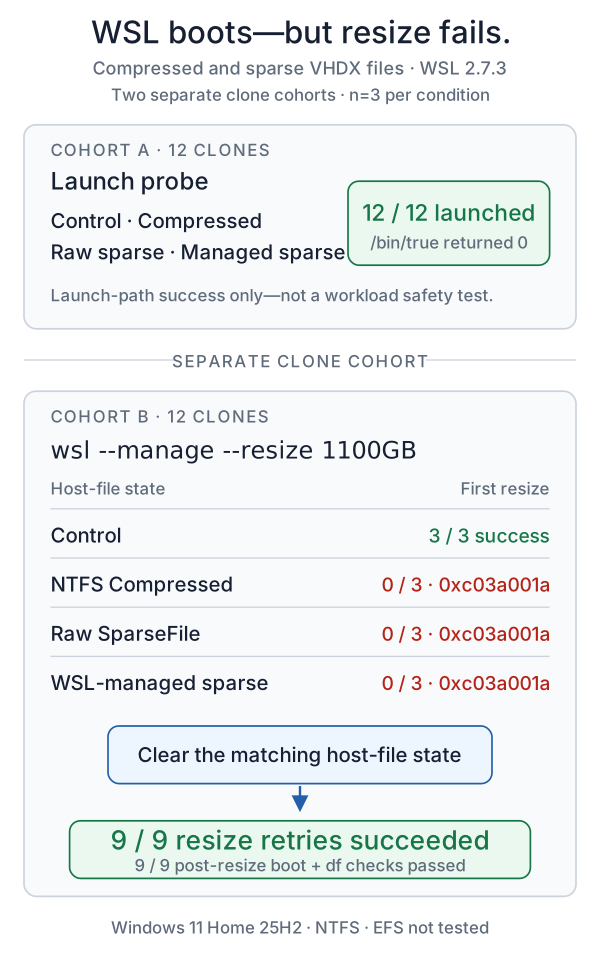
Figure 1. Launch and resize used separate clone cohorts. All 12 launch probes succeeded; nine non-control resize probes failed with 0xc03a001a; clearing the matching state restored all nine retries.
Finding 1: booting is not the test
Every conditioned VHDX launched successfully:
| Host-file state | wsl -d <clone> --exec /bin/true | Median (range) |
|---|---|---|
| None (control) | 3/3 | 2.372 s (2.366–2.432) |
| NTFS Compressed | 3/3 | 2.166 s (2.129–2.308) |
Raw SparseFile | 3/3 | 2.585 s (2.468–2.628) |
| WSL-managed sparse | 3/3 | 2.471 s (2.347–2.533) |
This is the first correction to the old mental model. On WSL 2.7.3, a compressed or sparse distro VHDX did not fail my launch probe. The attributes were still present after boot.
Do not read the small timing differences as a performance result. Three launches are enough to establish success versus failure, not to benchmark startup, and /bin/true proves that the launch path worked — not that running a production distro in every unusual file state is a good long-term idea.
I also compressed a VHDX before wsl --import-in-place as a separate check. Import and launch both succeeded, but that was one supporting run, not part of the n=3 matrix.
Finding 2: resize rejects every tested non-default state
The separately prepared resize cohort split cleanly on --resize:
| Host-file state | First resize | Exact Wsl/Service/0xc03a001a | Median first-attempt time |
|---|---|---|---|
| None (control) | 3/3 success | 0/3 | 4.926 s |
| NTFS Compressed | 0/3 success | 3/3 | 0.062 s |
Raw SparseFile | 0/3 success | 3/3 | 0.082 s |
| WSL-managed sparse | 0/3 success | 3/3 | 0.058 s |
All nine failures returned the same message and error code. WSL did not tell me whether the file was compressed or sparse, and the two ways of producing SparseFile were indistinguishable at the error boundary.
The failure was also immediate — roughly 0.06 to 0.08 seconds at the median — while a successful control resize took about 4.9 seconds and ran e2fsck plus resize2fs. That is consistent with rejection during the Windows virtual-disk stage, before e2fsck or resize2fs begins.
The WSL 2.7.3 source matches the split. Its normal HCS attach path explicitly allows compressed and sparse host files. The helper used by resize instead calls OpenVirtualDisk with OPEN_VIRTUAL_DISK_FLAG_NONE, then passes that handle to the resize operation. That code difference fits the measurement; I would not go further and call it an officially confirmed bug or an intentional product policy.
Finding 3: one attribute check narrows the cause
Open an elevated PowerShell as the same Windows account that owns the distro, and keep that window open through Finding 4. First stop WSL. wsl --shutdown is not optional here: the VHDX must be offline before you change its Windows file attributes.
wsl --shutdown
wsl --list --running --quiet
The second command should print nothing. Be aware that wsl --shutdown stops every distro and will interrupt VS Code Remote WSL, Docker Desktop’s WSL backend, and any other WSL job.
Then resolve the registered path for the exact distro name and inspect that file. The prefix check matters because WSL may store BasePath with a \\?\ prefix that ordinary PowerShell path commands do not handle consistently:
$distro = "Ubuntu"
$basePath = Get-ChildItem "HKCU:\Software\Microsoft\Windows\CurrentVersion\Lxss" |
  Get-ItemProperty |
  Where-Object DistributionName -eq $distro |
  Select-Object -ExpandProperty BasePath

if (-not $basePath) { throw "WSL distro not found: $distro" }
if ($basePath.StartsWith("\\?\")) { $basePath = $basePath.Substring(4) }
$vhdx = Join-Path -Path $basePath -ChildPath "ext4.vhdx"
if (-not (Test-Path -LiteralPath $vhdx -PathType Leaf)) {
  throw "VHDX not found: $vhdx"
}

Get-Item -LiteralPath $vhdx | Select-Object FullName, Attributes
I copy-paste tested that block in Windows PowerShell 5.1 against the registered production distro. It resolved the intended ext4.vhdx and made no changes. The outputs from my conditioned clones were:
Archive, Compressed
Archive, SparseFile
A plain control showed:
Archive
This is a first diagnostic check, not a complete diagnosis. It can identify the two states I reproduced, but it does not prove that every 0xC03A001A comes from an attribute; it also does not check a wrong path, ACLs, parent-folder inheritance, storage drivers, ReFS integrity, or VHDX corruption.
Finding 4: clearing the matching state restored resize 9/9
I removed only the state applied to each clone, then repeated the exact same resize target.
| Condition removed | Clear command median (range) | Resize after clear | Post-resize boot + df |
|---|---|---|---|
| NTFS Compressed | 13.123 s (9.541–15.637) | 3/3 success | 3/3 success |
Raw SparseFile | 0.024 s (0.021–0.027) | 3/3 success | 3/3 success |
| WSL-managed sparse | 0.055 s (0.054–0.058) | 3/3 success | 3/3 success |
In that same elevated PowerShell, run only the matching command. The fully guarded copy-paste flow, including exit-code checks, is in What to actually do.
# NTFS Compressed
compact.exe /u /f /a "$vhdx"

# Raw SparseFile created with fsutil setflag (the measured case)
fsutil.exe sparse setflag "$vhdx" 0

# Sparse mode that you enabled through WSL
wsl.exe --manage $distro --set-sparse false
After the clear, the files reported Archive, the retry took roughly five seconds, and df -B1 / showed the filesystem total grow from 1,081,101,176,832 to 1,161,425,506,304 bytes — an increase of 80,324,329,472 bytes (74.808 GiB) after filesystem overhead.
No Windows reboot was needed in any run. wsl --shutdown, followed by an empty running-distro list, released the handles every time.
Before changing the only copy of a distro VHDX, take a backup. Also check host free space. Decompressing a file or removing sparse allocation can require Windows to materialize bytes that were not previously backed by clusters. The previous post measured the expensive version of that transition: turning a hole-filled WSL sparse VHD off re-inflated it to its logical size.
SparseFile alone does not reveal how the state was created or whether the file already contains holes. I measured the raw fsutil ... setflag 0 fix only on clones whose flag I had set directly and whose allocation had not changed. If you do not know the origin, do not choose a clear command from Attributes alone; back up first and establish the file’s allocation and available host space.
Finding 5: compression saved real space; a sparse flag alone did not
There is a legitimate reason someone might compress AppData: it can save space. On this VHDX it saved more than I expected.
I measured host allocation with Windows’ GetCompressedFileSizeW, which reports the physical storage consumed by the file.
| Resize cohort, n=3 | Allocated bytes |
|---|---|
| Before NTFS compression | 6,548,357,120 |
| After compression, median | 4,956,434,432 |
| Saved | 1,591,922,688 bytes (1.48 GiB, 24.31%) |
compact /c took a median 65.285 seconds. The trade was not “almost no saving for a broken distro.” The distro still booted, and the saving was real — but WSL’s resize management path stopped working until I gave the 1.48 GiB back.
That 24.31% belongs to this 6.55GB Ubuntu image. It is not a general compression ratio for WSL, ext4, model weights, or AppData.
The sparse experiment says something different. Setting SparseFile changed the attribute in about 0.02 seconds but freed zero bytes in all three startup clones. After one boot, the median saving was still zero; one run moved by only 384 KiB. A sparse flag is permission for holes to exist, not a command that magically finds and punches them.
WSL-managed sparse can reclaim meaningful space after files are deleted — I measured that behavior in the previous post — but that is a different workload. For this experiment, the attribute itself was enough to block resize even before it saved anything.
What to actually do
If wsl --manage <distribution> --resize ... returns Wsl/Service/0xc03a001a, open one elevated PowerShell as the same Windows account that owns the distro. Keep that window open for the entire flow so $distro, $vhdx, and the HKCU registration stay in the same context.
$distro = "Ubuntu"

# Back up first. Choose a new destination with enough free space.
$backup = Join-Path (Get-Location) "$distro-backup-20260811.tar"
if (Test-Path -LiteralPath $backup) { throw "Backup already exists: $backup" }

wsl.exe --export $distro $backup
$exportExit = $LASTEXITCODE
if ($exportExit -ne 0 -or
    -not (Test-Path -LiteralPath $backup -PathType Leaf) -or
    (Get-Item -LiteralPath $backup).Length -eq 0) {
  throw "WSL export failed or produced an empty backup: $backup"
}

# Attribute changes require an offline VHDX.
wsl.exe --shutdown
if ($LASTEXITCODE -ne 0) { throw "wsl --shutdown failed" }

$running = @(wsl.exe --list --running --quiet)
$listExit = $LASTEXITCODE
if ($listExit -ne 0) { throw "Could not query running WSL distros" }
$running = @($running | Where-Object { -not [string]::IsNullOrWhiteSpace($_) })
if ($running.Count -ne 0) { throw "WSL is still running: $($running -join ', ')" }

$registrations = @(Get-ChildItem "HKCU:\Software\Microsoft\Windows\CurrentVersion\Lxss" |
  Get-ItemProperty |
  Where-Object DistributionName -eq $distro)

if ($registrations.Count -ne 1) { throw "Expected one WSL registration for: $distro" }
$basePath = $registrations[0].BasePath
if ($basePath.StartsWith("\\?\")) { $basePath = $basePath.Substring(4) }

$vhdx = Join-Path -Path $basePath -ChildPath "ext4.vhdx"
if (-not (Test-Path -LiteralPath $vhdx -PathType Leaf)) {
  throw "VHDX not found: $vhdx"
}

$attributes = (Get-Item -LiteralPath $vhdx).Attributes
$attributes
Then clear only the state you can identify, in the same PowerShell window. Do not run all three blindly.
If Attributes includes Compressed:
compact.exe /u /f /a "$vhdx"
if ($LASTEXITCODE -ne 0) { throw "compact.exe failed" }
If you enabled sparse mode through WSL:
wsl.exe --manage $distro --set-sparse false
if ($LASTEXITCODE -ne 0) { throw "WSL sparse-mode clear failed" }
Only for the raw fsutil setflag condition measured in this post:
fsutil.exe sparse setflag "$vhdx" 0
if ($LASTEXITCODE -ne 0) { throw "fsutil sparse clear failed" }
SparseFile alone does not reveal how the state was created or whether the file already contains holes. If you do not know its origin, stop and establish the backup, allocated size, and available host space before choosing a clear command.
After the measured clear, verify that no rejected attribute remains:
$attributesAfter = (Get-Item -LiteralPath $vhdx).Attributes
$attributesAfter
if ("$attributesAfter" -match 'Compressed|Encrypted|SparseFile') {
  throw "A rejected VHDX attribute is still present"
}
Retry with a target larger than the current filesystem, then verify both resize and launch:
$target = "1100GB"   # Replace with an appropriate larger target.
wsl.exe --manage $distro --resize $target
if ($LASTEXITCODE -ne 0) { throw "WSL resize failed" }

wsl.exe -d $distro --exec df -h /
if ($LASTEXITCODE -ne 0) { throw "Post-resize launch or df check failed" }
If the attribute output includes Encrypted, Microsoft’s WSL troubleshooting guidance is to clear EFS encryption on the distro profile. I did not test that branch because EFS was unavailable on this host.
If the attributes show only Archive, stop applying these fixes. Your 0xC03A001A needs a different diagnosis; repeatedly toggling VHDX attributes will not make an unrelated storage or image problem safer.
Scope and limitations
- One Windows 11 Home PC, one NTFS SSD, WSL 2.7.3, one Ubuntu image, and three independent clones per condition in each cohort.
- EFS VHDX, ReFS, network storage, combined attributes, cold reboot behavior, later WSL runtimes, and long-running guest workloads were not tested.
/bin/trueestablished launch-path success only; it was not a workload or long-term integrity test.- A separate immediately-before/immediately-after SHA-256 was not recorded for failed resize attempts, so this post makes no bit-for-bit non-mutation claim.
Measured on my own machine on 2026-08-11. The publication log lists all 24 primary runs. WSL 2.7.11 was the latest stable release at publication, but this matrix remains a WSL 2.7.3 result; 2.7.11 was not runtime-tested. Behavior is version-dependent—if another build behaves differently, tell me.